Meeting Agenda Template
A meeting agenda template with nine key elements, plus worked agenda examples for a weekly team meeting, a board meeting and a project kickoff.
What is a Meeting Agenda Template?
A meeting agenda template is a tool designed to make building an agenda easy. It does this by helping to gather all the elements needed to plan and deliver an effective meeting.
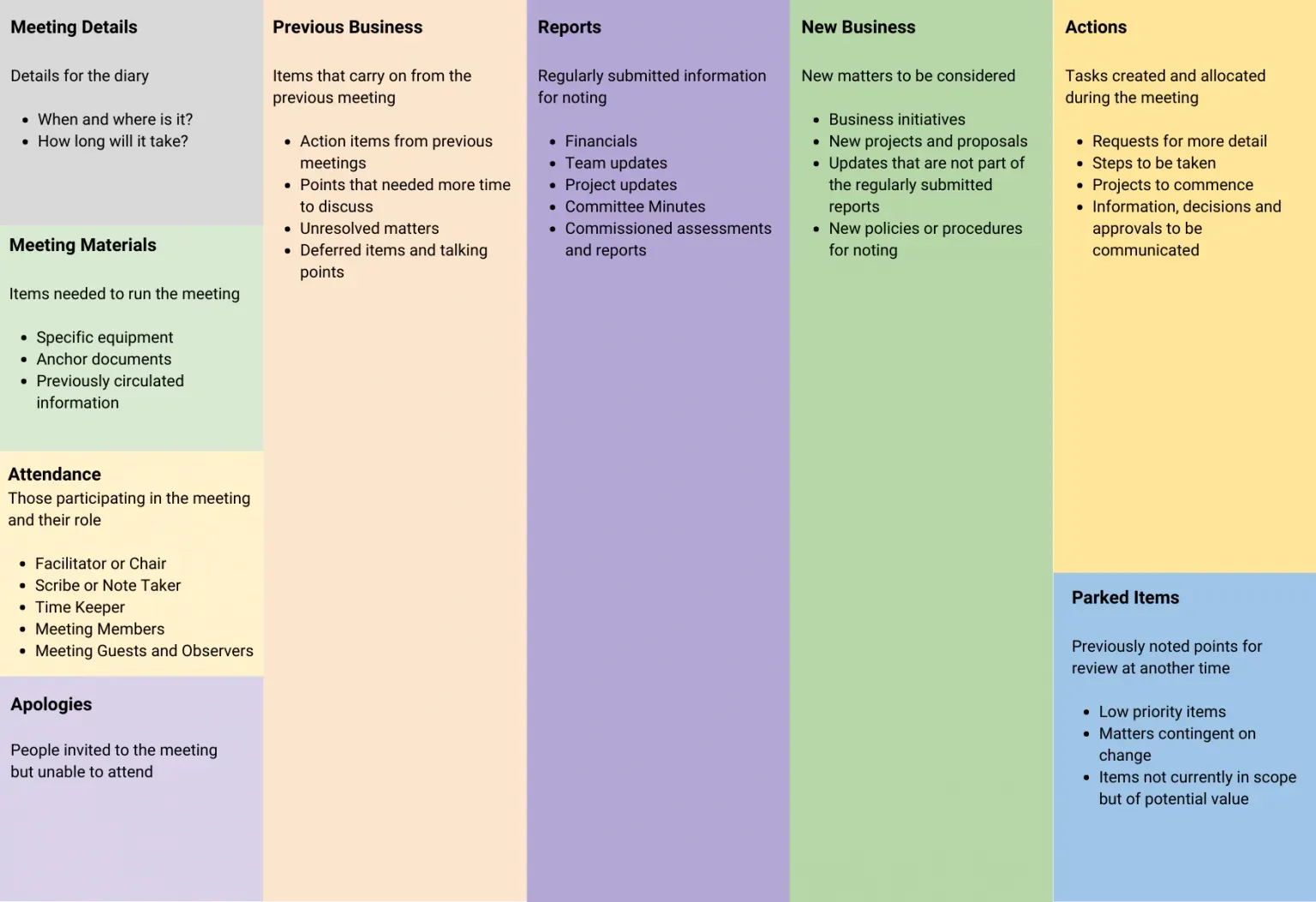
A meeting agenda template offers a customizable framework that can be shared by everyone who is involved in the meeting. This helps to set a collaborative tone even before the meeting begins.
Because everyone can see and contribute to the template, stakeholders have shared ownership of the meeting process. This increases buy-in, which contributes to meeting effectiveness.
GroupMap’s meeting agenda template includes nine elements to get you started:
| Element | What it holds | Mark it and time |
|---|---|---|
| Meeting details | When and where the meeting is, and how long it runs. | Set-up (2 min) |
| Meeting materials | Equipment, anchor documents and pre-reading that has to be in the room before you start. | Set-up (before the meeting) |
| Attendance | Who is participating and the role they hold: chair or facilitator, scribe, timekeeper, members, guests and observers. | Set-up (2 min) |
| Apologies | People invited who cannot attend, recorded so the minutes are complete. | For noting (1 min) |
| Previous business | Outstanding actions, unresolved matters and talking points deferred from the last meeting. | For discussion (10 min) |
| Reports | Regularly submitted information: financials, team and project updates, committee minutes, commissioned assessments. | For noting, or for approval where a report has to be accepted (15 min) |
| New business | Matters raised for this meeting: initiatives, new projects and proposals, policy or procedure changes. | For discussion or for decision (20 min) |
| Actions | Tasks created and allocated in the meeting, the steps behind them, and the decisions to be communicated. | For noting (8 min) |
| Parked items | Low-priority points, matters contingent on something else, and items out of scope today but worth keeping. | For noting (2 min) |
The times are one worked split of a 60-minute meeting, not a rule. The three set-up rows carry no marking because the room is not being asked to do anything with them. What matters is that every other item carries a time and a marking before anyone walks in, so participants know how long they have and what is being asked of them.
Who should use a Meeting Agenda Template?
Anyone responsible for a meeting can use a meeting agenda template. The sections stay the same whether you are running a 30-minute check-in or a 90-minute board meeting; only the items under them change, which is what makes one template worth reusing.
As such, the template could be used by:
- Meeting Facilitators
- Executive Officers
- Company Secretaries
- Team Leads and Managers
It is a great tool to reduce the time burden of meetings while improving participation rates and record-keeping accuracy.
Tips for effective meeting agendas
- Map out and circulate a meeting timeframe that includes the preparation of the agenda and all associated deadlines
- Allocate times for each section of the agenda
- Align each section of the agenda with the action it needs. Make clear whether an item is:
- for noting
- for discussion
- for approval
- for a decision
- Regularly review and update your agenda to make sure it delivers value to your meetings.
Why use Meeting Agenda Template?
A meeting agenda template makes organizing a meeting faster and easier, without sacrificing attention to detail.
While the importance of an agenda is well-known, it’s often given a low priority. Its preparation can be overshadowed by more urgent matters. It can be allocated to a person who has the time rather than the expertise to deliver an agenda. It can be pulled together ‘on the fly’ and so can lack clarity of process.
A meeting agenda template overcomes all of these obstacles as well as delivers other benefits by –
- Presenting an easy-to-follow structure to which everyone can contribute.
- Delivering a transparent meeting planning process.
- Sharing the agenda building process, thereby reducing the time any one person needs to allocate to its delivery.
- Leveraging the expertise of the whole group in support of the planning process.
- Including documents as attachments, so they are easy to distribute to the group and document control is effortlessly supported.
The meeting agenda template reduces the time required to document the meeting itself. This is because key information and discussion points have already been recorded.
You can also use it to:
- Set clear, organization-wide, meeting standards that deliver consistency between meetings and across teams
- Capture key documents for good governance
- Track outputs and decision points
- Make it easier to rotate the meeting facilitator role
- Provide an opportunity for all meeting participants to contribute and feel heard
- Deliver all meetings types including online, hybrid, and asynchronous
- Build a psychologically safe meeting space
Meeting agenda examples
Here are three agendas in the shape this template produces: an item, who leads it, how long it gets, and what the room is being asked to do with it. Copy the closest one and change the items.
Weekly team meeting agenda (30 minutes)
A standing team meeting is usually 20 minutes of reporting and 10 minutes of the thing that actually needed the meeting. Cap the reporting so the blockers get real time.
| Time | Agenda item | Led by | For |
|---|---|---|---|
| 3 min | Attendance, apologies, and any change to the agenda | Chair | Noting |
| 5 min | Actions from last week: done, not done, and why | Chair | Noting |
| 8 min | Progress against this week’s priorities, one minute each | Each workstream lead | Discussion |
| 9 min | Blockers: what is stuck, and what we change | Chair | Decision |
| 5 min | New actions, and anything parked until next week | Chair | Noting |
Board meeting agenda (90 minutes)
A board agenda doubles as a governance record, so every item needs its marking set in advance and the minutes have to match. This is the version that stretches the elements furthest: everything except meeting details and meeting materials, which live in the header and the pre-reading pack rather than on the running order.
| Time | Agenda item | Led by | For |
|---|---|---|---|
| 5 min | Welcome, attendance and apologies | Chair | Noting |
| 5 min | Declarations of interest | Chair | Noting |
| 5 min | Minutes of the previous meeting | Chair | Approval |
| 10 min | Previous business: matters arising and outstanding actions | Chair | Discussion |
| 15 min | Finance report and year-to-date position | Treasurer | Approval |
| 15 min | Chief executive’s report | CEO | Noting |
| 20 min | New business: the one substantive item for this meeting | Item sponsor | Decision |
| 10 min | Risk register review | Company Secretary | Discussion |
| 5 min | Actions, parked items, and date of the next meeting | Company Secretary | Noting |
Project kickoff agenda (60 minutes)
A kickoff has to produce agreements, not enthusiasm. Two of these items are working sessions rather than presentations, so give participants a way to contribute at the same time instead of going around the room.
| Time | Agenda item | Led by | For |
|---|---|---|---|
| 5 min | Why this project exists and what success looks like | Project lead | Noting |
| 10 min | Scope: what is in, and what is explicitly out | Project lead | Discussion |
| 10 min | Risks and unknowns, added independently before anyone sees the room’s ideas | Everyone | Discussion |
| 10 min | Vote on the risks that need a plan now | Facilitator | Decision |
| 10 min | Roles, decision rights, and how we will work week to week | Sponsor | Decision |
| 10 min | Milestones and the first two weeks | Sponsor | Approval |
| 5 min | Actions and parked items | Scribe | Noting |
Whichever one you start from, keep the last row. A meeting that ends without allocated actions and a parked list hands the same discussion back to the next meeting.
How to create a meeting agenda template
When it comes to remote and distributed meeting participants, this online template is a real game-changer. It means everyone can be actively involved in the planning process and so completely up to speed when the meeting itself starts.
Of course, with the template populated, moving to the next step of delivering the meeting online can be done seamlessly.
Screen sharing software, video conferencing, and online collaboration tools allow facilitators to deliver inclusive meetings. GroupMap’s meeting agenda template has been designed with this in mind. It can be used with any group type (co-located, hybrid or remote). So it’s a cost-effective way of removing geographical barriers to participation.
The time it takes to complete a meeting agenda template depends on the nature of the meeting and the detail required. Sharing the template with plenty of lead time will allow contributors to work it in with their own schedules. This will help deliver a better quality outcome.
How to use a meeting agenda template
Using the template is a loop rather than a document: build the agenda before the meeting, run the meeting from it, capture what was decided in the same place, and roll what is unfinished into the next agenda.
- Set the sections and the times. Open the template, keep the elements this meeting needs, and delete the ones it does not. Put a time and a marking against every item. That marking is the single biggest change you can make to how a meeting runs, because it tells participants what is expected of them before they arrive.
- Invite participants to fill it in. Share the link, code, or QR code and participants join with no account. Anyone can add items to the right section, and pre-reading goes on the item it belongs to as a file, image or link, so nobody is searching an email thread mid-meeting.
- Run the meeting from the board. Work down the agenda in order and use the step instructions and timers to hold each item to its allocation. For items where you want everyone’s view rather than the first view, have participants add their thoughts independently before the discussion opens, then vote or rank to find where the room actually stands.
- Close every item with an action or a park. Add action items directly to the point they came from, so the decision and the follow-up stay attached. Anything you cannot finish goes to parked items rather than into the overrun.
- Export the record and reuse the agenda. Export the completed board to PDF, CSV or Excel and it doubles as the minutes: the discussion, the decisions and the actions are already written down. Next meeting opens with previous business populated instead of blank.
Done this way, the agenda stops being a document one person writes the night before and becomes the record of the meeting itself. If you need the case for spending this effort at all, the argument is set out in why meeting agendas are important.
Related templates
References
- How to Design an Agenda for an Effective Meeting
- How to conduct successful meetings
- Meeting procedures
Save effort, time and money with GroupMap
GroupMap offers more than just an online digital whiteboard. Its innovative platform is designed to enhance the quality of your team’s decisions. With features that prevent bias and keep facilitation simple, GroupMap makes sure no single voice dominates and keeps conversations productive and inclusive. Its intuitive interface is easy for anyone to use, and its scalable design supports small teams and large groups whether they are face to face or around the globe. Customizable templates and workflows keep discussions focused on objectives, helping you drive actionable outcomes each and every time.
Frequently asked questions
What is a meeting agenda template?
What should a meeting agenda include?
Why use a meeting agenda template?
Who should use a meeting agenda template?
How do you write an effective meeting agenda?
Can a meeting agenda template be used for remote meetings?
How to run it in GroupMap

Set agenda elements
Define the sections of the meeting agenda template

Invite
Invite contributors

Brainstorm
Populate each section of the meeting agenda template
Ready to get everyone on the same page?
Start a free GroupMap and turn your next discussion into clear, shared decisions.