Risk Assessment
Use our free risk assessment matrix to map risks by likelihood and impact. Run risk mapping live with your team, with a worked example and a ready template.
What is Risk Assessment?
A risk assessment is a systematic evaluation of potential risks for an activity, project, or business. Risks are identified and prioritized for action based on the probability of them occurring (likelihood) and the seriousness of the outcome if they do (impact). Risk assessment activities are sometimes referred to as risk analysis or risk mapping.
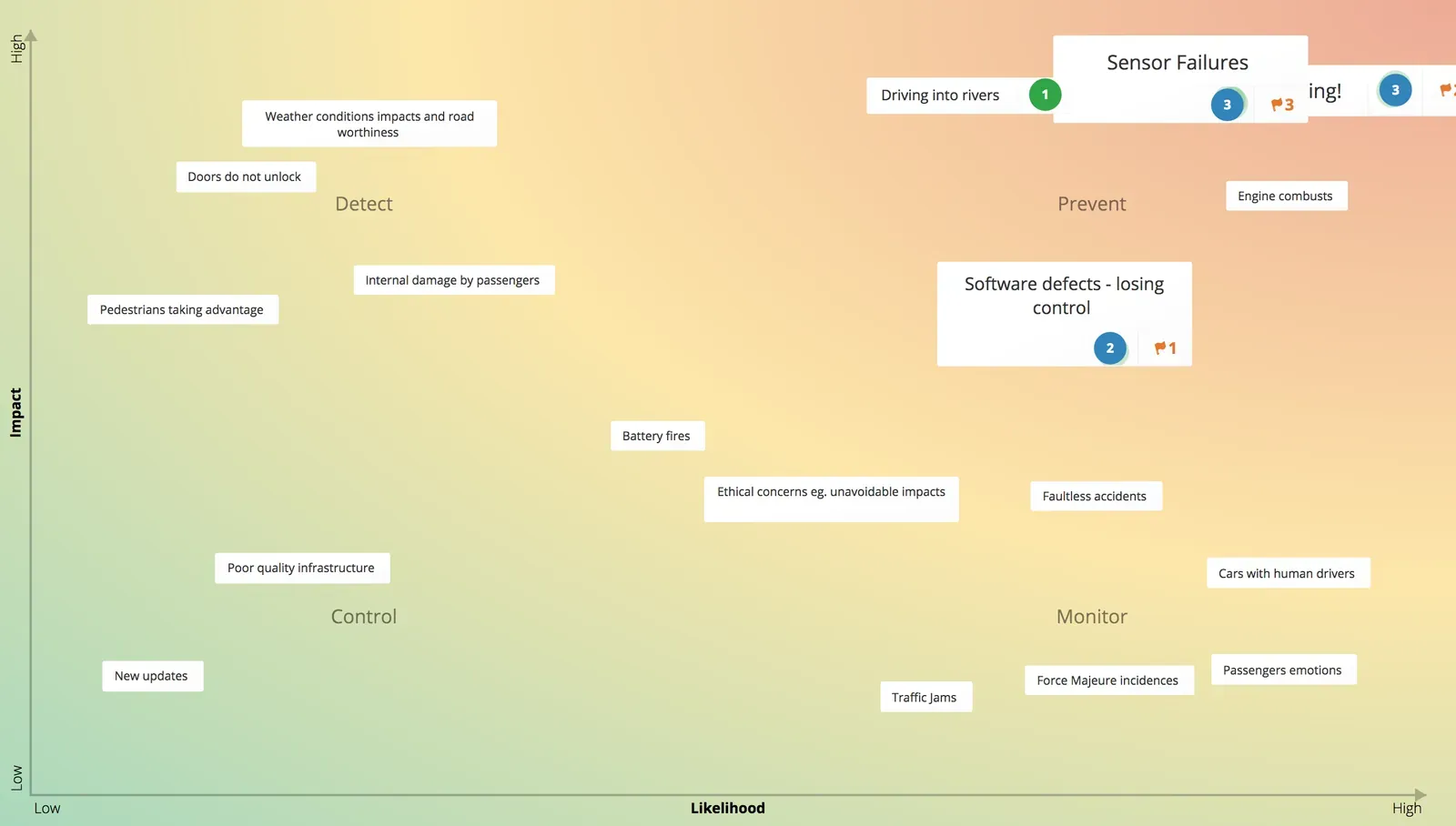
A risk assessment can be quantitative or qualitative. For quantitative analysis, explicit values are assigned to the probability of a risk occurring, and impact is often measured in financial terms. Qualitative risk assessments do not use numbers, and their main aim is to identify those risks that are perceived to pose the most danger.
Key takeaways
- Risk mapping plots each risk on a matrix by how likely it is to occur and how big its impact would be.
- The four quadrants (critical, difficult, routine, and minor risks) show at a glance where to spend limited time and budget.
- Prioritize the critical and difficult risks first; monitor the minor ones and control routine ones through everyday procedures.
- Run it as a group so the ratings reflect shared expertise rather than one person’s view. GroupMap averages everyone’s positions automatically.
Why do a Risk Assessment?
Risks assessments provide an opportunity to identify and understand hazards, vulnerabilities, and threats that could impact negatively on the business. Using this information, an organization can then prioritize expenditure and effort on risk mitigation and control strategies. Risk assessments are an opportunity for your whole team to participate in identifying key risks and obtain a mutual understanding of critical issues that might impact on your success.
Related templates
Tips for facilitating an effective Risk Assessment
- Carefully select participants to provide expert knowledge but also a fresh perspective.
- Use technology to involve critical people in different locations rather than miss their contribution.
- Be specific rather than broad when defining stakeholders.
- Provide adequate time in the session to position and rate activities.
- Communicate outcomes and regularly update throughout the project.
The Risk Assessment template
A qualitative risk assessment template (aka risk map) provides a visual representation of risks. The relative likelihood of a risk occurring appears on the X axis, while the Y-axis reflects the relative impact the risk would have if it eventuates.
| Quadrant | Likelihood | Impact | What to do |
|---|---|---|---|
| Critical risks | High | High | Give the most urgent attention; prevent as a priority |
| Difficult risks | Low | High | Hardest to control; use insurance, redundancy, or off-site backups |
| Routine risks | High | Low | Handle through everyday controls and procedures |
| Minor risks | Low | Low | Monitor only; not a priority for finite resources |
Difficult risks
These risks are unlikely to occur but would have a large impact if they did.
Critical risks
These risks have a medium to high likelihood of occurring, and would have a severe impact if they do.
Minor risks
These risks are unlikely to occur and would have minimal consequences if they did. With finite resources, these risks are not a priority.
Routine risks
These risk may occur frequently but have a low impact.
Risk assessment example
Imagine a small software company running a risk assessment before a product launch. The team brainstorms risks, then rates each one for likelihood and impact and plots it on the risk map:
- A critical supplier goes out of business: low likelihood, high impact. A difficult risk, so the team lines up a backup supplier.
- A data breach exposes customer records: medium likelihood, high impact. A critical risk that gets top priority, with a security review and monitoring.
- Minor UI bugs reach release: high likelihood, low impact. A routine risk, handled through the normal QA process.
- A niche integration is deprecated: low likelihood, low impact. A minor risk that is noted and monitored, but not acted on now.
Mapping the risks this way makes it obvious where to spend limited time and budget: on the critical and difficult risks rather than on every risk equally. Your own ratings come from the group discussion.
Risks that need managing beyond the session go into a RAID log, alongside the project’s assumptions, issues and dependencies.
How to run a Risk Assessment activity
The best process for evaluating risks to an organization will vary depending on the type of industry and the rules and regulations it is subject to. Organizations involved in high-risk industries (nuclear, aviation, medical, engineering) may have dedicated risk managers and departments whose sole role is to assess and plan controls for risks. For many businesses, however, a risk assessment can be carried out by a group of people with expert knowledge in the product, services, or process under assessment.
Give context and define the scope of the risk assessment. The goals of a risk assessment will depend on the industry, organization, and business processes under examination. Participants in the session should have expert knowledge of the area under examination or be provided with enough information to allow them to contribute effectively.
Present any data and information that will help give context for the session. Examples of information might include:
- Results from a business impact assessment, Business Model Canvas, SWOT analysis, PESTLE analysis
- Data from the organization’s quality management and other information systems
- Industry trends and news
- Relevant rules and regulations
Define whether the session is addressing strategic, project, process, systems, product or service risks. By making the scope of the meeting clear, participants can focus their efforts, eg:
- Organizational risks over the next five years
- Risks associated with the development of a new product or service.
- Health & Safety risks for employees involved in a particular manufacturing process.
- Risks to confidential data and information systems.
It is also useful to define criteria for Likelihood and Impact axis in the matrix. Depending on the scope of the session, these definitions are likely to be quite different from one risk analysis to another.
For example:
- A high likelihood could mean the risk is almost certain to occur, medium – perhaps once every couple of years, and low is a once in a decade occurrence.
- A high impact might mean the business ceases to function for a period of time or there are multiple fatalities. A low impact could mean minor injuries and a delay in deliveries for a few days.
Participants brainstorm ideas on hazards, threats, and vulnerabilities that can have an adverse impact on the business. They then position those risks according to how likely they believe they will occur and how serious they believe the outcome would be.
Examples of risks:
- Environmental hazards
- Workplace Health & Safety Hazards
- Infrastructure Failure
- Financial Risks
- Information systems vulnerability
- HR Risks
Initial brainstorming can be done individually, in small groups, or as a whole. Gather ideas using a whiteboard, sticky notes, or on dedicated software such as GroupMap.
Using a specialized online tool makes the steps that follow much easier and more efficient, especially if the group is large or in different locations.
Once all the ideas are gathered, remove duplicates, combine similar risks and discard any that aren’t within scope.
Discuss each risk and obtain consensus on where the risk should be positioned on the risk map according to the likelihood it will occur and the impact it would have.
This step is when a tool like GroupMap comes into its own. Individuals or small groups can position each risk according to their insight, and the software automatically provides a group average.
The group votes on those risks they believe are the top priority and should be addressed first.
Each participant or small group has one or more votes to allocate across the risks. They may use one vote for each of their priorities or use multiple votes on something they believe is critical.
Identify a range of solutions to prevent, reduce, control, or insure against those risks which are seen as a priority and agree on the best choice using available resources.
Risk mitigation strategies should try to eliminate the risk entirely or reduced it to an acceptable level. The amount of resources allocated to each action should be in proportion to the expected results. There should be a balance between the cost of preventing the risk versus the cost of recovering should it eventuate.
- Difficult Risks (High Low/High Impact) are the most difficult to control. Possible solutions include insurance, inbuilt redundancy, or backup systems off-site.
- Critical Risks (High Likelihood/High Impact) require the most urgent attention. Management should give priority to preventing these.
- Minor Risks (Low Likelihood/Low Impact) should be monitored to ensure they don’t develop into more serious problems.
- Routine Risks (High Likelihood/Low Impact) can be addressed by implementing controls in routine procedures.
Assign responsibilities, resources, and timeframes for completion.
Compile a report on the results of the risk assessment process. The report should contain the identified risks, the planned actions, those responsible, and timeframes for implementation.
Use the report to:
- Communicate outcomes with participants and relevant stakeholders to encourage buy-in and ownership of risk management efforts.
- Monitor the status of risks, actions, and resource allocations on a regular basis as they are likely to change over time.
- Contribute to other business development processes, e.g. planning, product development, and budgeting.
GroupMap automatically generates visually appealing reports in several formats for distribution, saving time and effort after the workshop.
Who should complete a Risk Assessment?
Because the technique is so simple and versatile, development of a Risk Map is useful for:
- All industries
- All levels of an organization
- All departments
- Existing or new businesses
- Projects
- Business processes
Use risk mapping:
- As part of regular organizational reviews
- To proactively assess changing business conditions
- To explore new initiatives
- To focus and redirect efforts and resources
- As part of emergency, crisis and business continuity planning
- As a broad environmental scan for initial planning
Save effort, time and money with GroupMap
GroupMap offers more than just an online digital whiteboard. Its innovative platform is designed to enhance the quality of your team’s decisions. With features that prevent bias and keep facilitation simple, GroupMap makes sure no single voice dominates and keeps conversations productive and inclusive. Its intuitive interface is easy for anyone to use, and its scalable design supports small teams and large groups whether they are face to face or around the globe. Customizable templates and workflows keep discussions focused on objectives, helping you drive actionable outcomes each and every time.
Frequently asked questions
What is risk mapping?
What is a risk assessment matrix?
What are the four categories on a risk map?
What is an example of a risk assessment?
What is the difference between qualitative and quantitative risk assessment?
How to run it in GroupMap

Scope
Give context and identify the scope of the risk assessment

Brainstorm
Gather input and ideas on the risks to the business

Position
Position risks according to their perceived likelihood and impact

Prioritize
Vote to identify which ones people think are the most urgent priorities for action

Share
Report on the outcomes and monitor as part of your risk management strategy
Ready to get everyone on the same page?
Start a free GroupMap and turn your next discussion into clear, shared decisions.