Start Stop Retrospective
Start Stop Retrospective is an effective way for teams to reflect on their experiences and decide on what things they should change as they move forward.
What is a Start Stop Retrospective?
A start stop retrospective is a simple and effective way for teams to reflect on their recent experiences and decide on what things they should change as they move forward.
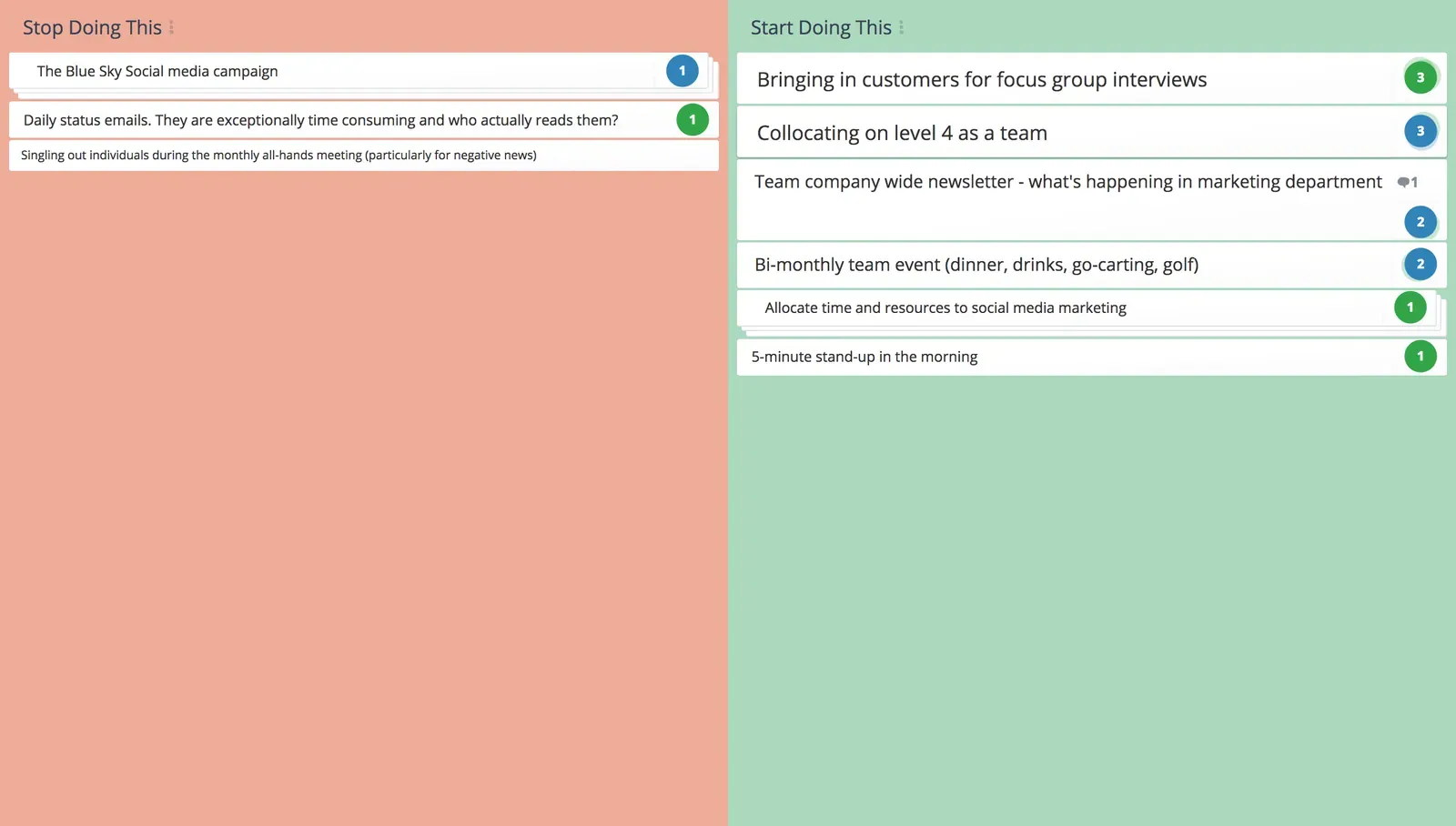
- Start – activities are those things the team will begin doing in the next cycle.
- Stop – looks back at the previous cycle of the project to identify which things didn’t work and should cease.
Why do a Start Stop Retrospective?
The start stop retrospective is one of the simplest project review techniques and requires no special equipment or knowledge to complete.
This technique starts by identifying actions that team members think they should “do” rather than “ideas and issues” that require solutions and then the development of an action plan as with Agile and 4Ls Retrospectives.
This retrospective technique:
- Gives teams an opportunity to review how they are going and identify improvements they can implement in the future.
- Makes it easier for teams to clarify issues, weight the impact of ideas, and reach a consensus based on shared priorities.
- Is very action orientated and provides momentum and energy for the team. Each item on the list results in behavioral change.
- Empowers teams to continuously improve the way they work.
Tips for effective Start Stop Retrospective
- Use technology to involve critical people in different locations rather than miss their contribution.
- Minimize Groupthink by brainstorming ideas individually then combining issues to get the overall picture.
- Be specific rather than broad when defining actions.
- Provide adequate time in the session to discuss and vote on actions.
Who should do a Start Stop Retrospective?
Because of it’s simplicity this retrospective method is suitable for:
- All kinds of project teams including software development
- Program reviews
- Executive reviews
- Personal performance evaluations
- 4Ls retrospective
- Agile retrospective
- Starfish retrospective
- Anchors and engines
- DAKI retrospective
Start Stop Retrospective template
Start
Activities that may:
- improve processes
- reduce waste
- have a positive impact on the way the team operates
As with “stop” activities, consider both technical and behavioral aspects.
Stop
Activities that:
- are inefficient
- waste time or resources
- have a negative impact on the way people feel or the way things work
Activities on this list may be technical or behavioral things and should cease.
How to run a Start Stop Retrospective
A start stop retrospective is one of the simplest review tools. It require no specialized equipment or skills, other than the ability to facilitate group discussions.
If the review team is scattered over different locations, there are challenges ensuring everyone is involved, and facilitators may need to look beyond the usual sticky notes and whiteboards to video conferencing, web-based applications such as Google docs, and specialized online collaboration tools such as GroupMap.
Most start stop retrospectives will take less than 20 minutes. You can time-box stages of the process to keep the team on track.
Team members think about what actions they should start and stop doing as a team. This step can be done individually or in small groups, then combined to reflect the whole team’s outlook.
Use a whiteboard or poster paper with sticky notes, an online document such as Google Docs, or a specialized online collaboration tool such as GroupMap.
The important idea in this step is that items must be “activities” as opposed to the “ideas” generated by other review techniques such as 4L’s and Agile Retrospectives. The items in each list are already actions, so the action planning step is not necessary.
Make each action visible to the whole group so they can be discussed, clarified, and challenged where necessary, to ensure shared understanding.
Combine all individual contributions, group duplicates or similar actions, and discard those which aren’t in scope.
Once the final list of actions is clarified, the team votes on the most important moving forward.
Allocate each team member one or more votes to distribute across the action lists according to their priorities. They can choose between single or multiple votes per action.
The result is a prioritized list of what the team will start and stop doing during the next project cycle.
Compile and distribute a report on the retrospective outcomes to the team. GroupMap automatically generates visually appealing reports and action plans in several formats for distribution, saving time and effort after the analysis.

Save effort, time and money with GroupMap
GroupMap offers more than just an online digital whiteboard. Its innovative platform is designed to enhance the quality of your team’s decisions. With features that prevent bias and keep facilitation simple, GroupMap makes sure no single voice dominates and keeps conversations productive and inclusive. Its intuitive interface is easy for anyone to use, and its scalable design supports small teams and large groups whether they are face to face or around the globe. Customizable templates and workflows keep discussions focused on objectives, helping you drive actionable outcomes each and every time.
Frequently asked questions
What is a start stop retrospective?
What do start and stop mean?
How do you run a start stop retrospective?
How is start stop different from start stop continue?
Who should use a start stop retrospective?
How to run it in GroupMap

Brainstorm
Discuss and populate the two columns of the start stop retrospective template.

Group
Discuss and group any common themes.

Vote
Vote on the key areas you need to take action on.

Share
Share and communicate the outcomes of the session to relevant stakeholders.
Ready to get everyone on the same page?
Start a free GroupMap and turn your next discussion into clear, shared decisions.