Corrective Action Plan
Address problems with a Corrective Action Plan that helps your team move forward. Try it now.
What is a Corrective Action Plan?
A Corrective Action Plan is a systematic approach to addressing problems or issues that have been identified in a process, system, or project.
Why use a Corrective Action Plan?
A Corrective Action Plan can be used when there is a need to address and improve an issue in the workplace. It could be the quality of a product or service, customer satisfaction, or the overall efficiency and effectiveness of a process or system.
It helps your organization identify and address problems early on, before they become larger issues that can negatively impact the organization’s reputation, financial performance, and overall success.
A worked Corrective Action Plan example
The three columns are worked in order, and the order is the discipline: the group agrees what is wrong before it argues about fixes, and agrees the fix before it decides how anyone will know it worked. Here is what that looks like filled in.
Say a support team’s replies have been getting slower for two months. Nobody disputes it, and everybody has a theory. Rather than open with the theories, the group puts up the three problems it can agree on.
| Top 3 Issues | Corrective Action | Measurement |
|---|---|---|
| Tickets sit unread overnight because nobody is on the queue outside business hours | Publish a roster so one person is named on the queue for each evening and weekend | Nothing waits more than twelve hours for a first reply, checked weekly |
| The same three questions make up most of the volume and get answered from scratch every time | Write one good answer for each of the three and put them where the team already looks | Those three questions are answered from the saved replies, and the time spent on them falls |
| Complex tickets bounce between people because there is no rule for when to escalate | Agree one escalation rule and write it into the queue’s own notes | No ticket changes hands more than twice before it is resolved |
Read across a row and each action answers its own issue. Read down the measurement column and you have the agenda for the follow-up session, already written.
Two things are worth copying from this example. Every issue is specific enough that somebody outside the room would recognize it: ‘handover notes are missing’ beats ‘communication’. And every measurement is something the group can check later without reopening the argument, which is what stops a plan quietly lapsing.
Notice what the example does not do. Nobody is named as the problem. A Corrective Action Plan works when a group is fixing a process it shares, and it stops working the moment it reads as a case against a person. If the honest problem is one person’s performance, that is a conversation, not a workshop.
Who should run one?
Anyone who is involved in a process or system can benefit from a corrective action plan. This includes
- Individuals and teams responsible for quality control, risk management, and Six Sigma.
- Project managers
- Change agents and leaders
- Team leaders and agile scrum masters
Tips for effective Corrective Action Plans
- Be inclusive. Involve the whole team or group.
- Use technology to involve people in different locations rather than miss their contribution.
- Minimize Groupthink by brainstorming ideas individually.
- Be specific rather than broad when defining ideas.
- Keep things positive. Remind people they are helping to build solutions and avoid the ‘blame game’.
- Provide adequate time in the session for people to share their ideas.
- Monitor outcomes, if improvements aren’t observed revisit the process.
How to use the Corrective Action Plan template
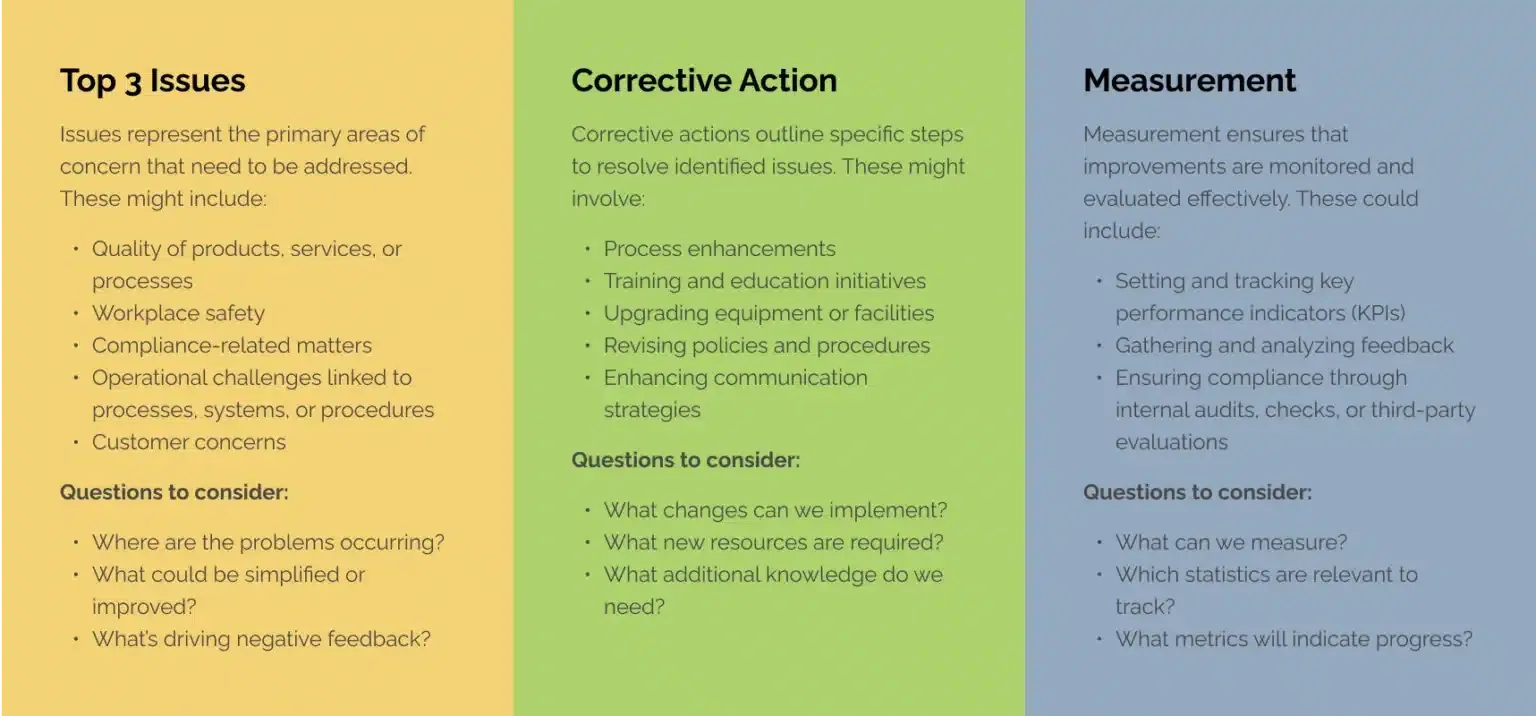
The Corrective Action Plan is a map designed to facilitate a collaborative approach to identifying and addressing issues in the workplace.
Start by making sure all stakeholders impacted by issues have access to the map. Using an online collaborative tool such as GroupMap allows those stakeholders to engage both in person and remotely. It can also allow for the group to share their input either synchronously or asynchronously depending on their availability.
As one section of the map leads to the next, it is best to work through it one column at a time. First have the group decide upon the top three issues it will discuss. Then have them settle on the corrective actions they will use to address them. Finally, have the group identify the various metrics that will be used to track success in the ‘Measurement’ column.
Start by inviting the group to add their top three issues to the map; one in each box. The ideas can be discussed with people indicating if they like or dislike each issue (see next step).
Once the three issues are defined and agreed to by the group, move on to ‘Corrective Action’. Again, invite the group to add corrective actions for each issue, and use the like and dislike voting to decide which of them the group will take forward.
Finally, have the group consider ‘Measurement’. Invite the group to suggest the way in which each of the actions can be measured and tracked over time.
Participants indicate if they like or dislike a suggestion by clicking on a thumbs up or thumbs down icon which helps to inform the decision making process.
This can be done both quickly and anonymously. This way, all participants have equal say on each of the ideas shared.
Discuss the consolidated list of issues, actions and how they will be measured, and share with the stakeholders involved.
GroupMap automatically generates visually appealing reports and action plans in several formats for distribution, saving time and effort after the analysis.
Follow up with group members to ensure that actions have been delivered. Using the agreed measurements, review progress regularly and make adjustments as needed.
Where the corrective action comes out of a live project, track it alongside the project’s risks and dependencies in a RAID log.
Related templates
References
- What is Corrective Action Plan?
- Corrective Action Plans Developing and Managing the Process
- Making the financial case for corrective action to management

Save effort, time and money with GroupMap
GroupMap offers more than just an online digital whiteboard. Its innovative platform is designed to enhance the quality of your team’s decisions. With features that prevent bias and keep facilitation simple, GroupMap makes sure no single voice dominates and keeps conversations productive and inclusive. Its intuitive interface is easy for anyone to use, and its scalable design supports small teams and large groups whether they are face to face or around the globe. Customizable templates and workflows keep discussions focused on objectives, helping you drive actionable outcomes each and every time.
Frequently asked questions
What is a Corrective Action Plan?
What are the three columns in a Corrective Action Plan?
When should you use a Corrective Action Plan?
Who should run a Corrective Action Plan?
How do you write a Corrective Action Plan?
What is the difference between a Corrective Action Plan and root cause analysis?
How to run it in GroupMap

Brainstorm
Add ideas one column at a time

Like/Dislike
Indicate which ideas you support

Action
Share and implement agreed actions
Ready to get everyone on the same page?
Start a free GroupMap and turn your next discussion into clear, shared decisions.