Empathy Map
Use the Empathy Map template to capture one customer persona's pains, gains and needs, so a group builds a shared picture before designing for them.
What is an Empathy Map?
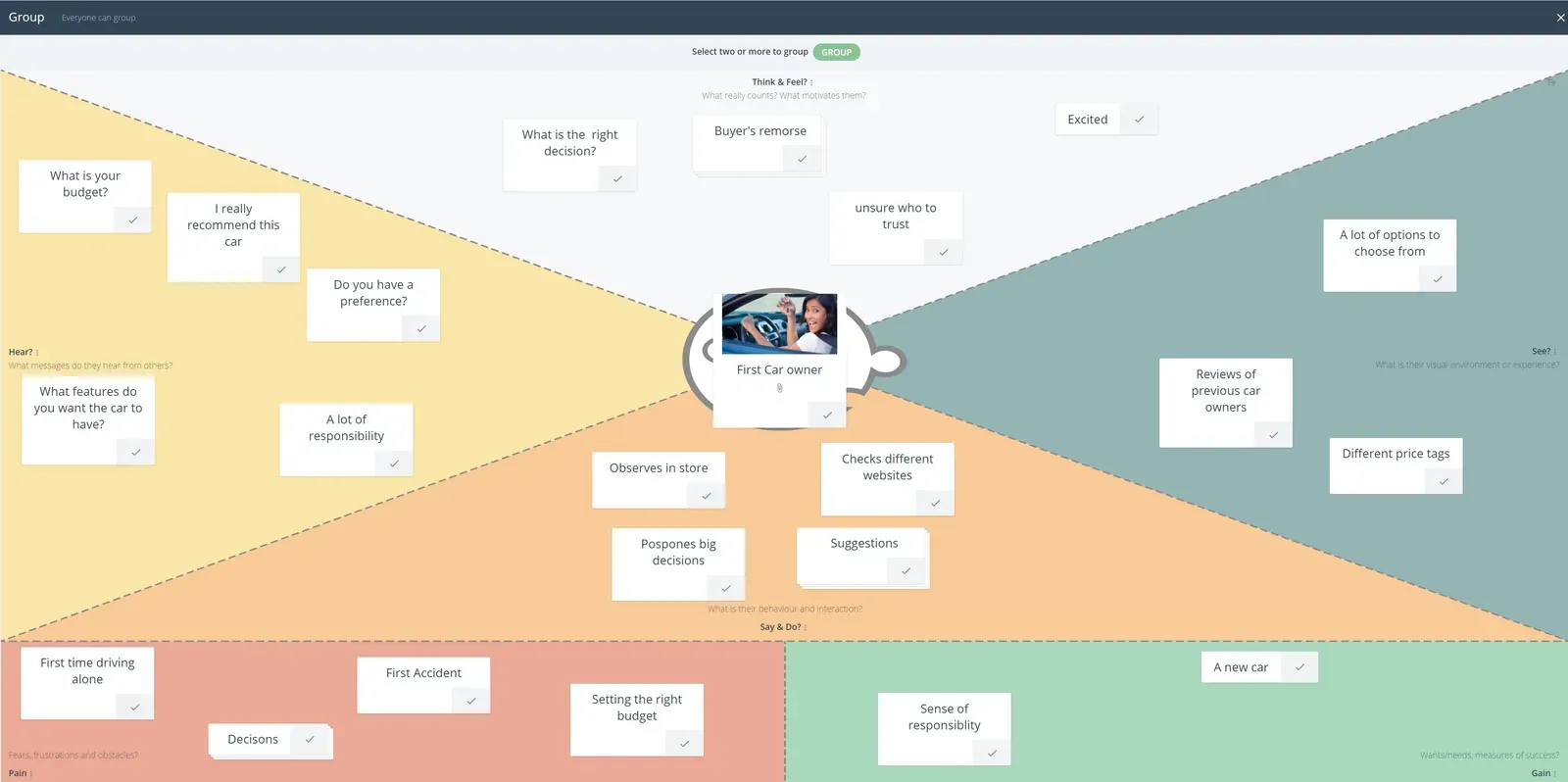
This design thinking tool helps the team explore the persona, pains and gains of a particular customer in order to improve service or product value to them. By capturing perspectives and building empathy, this helps with key judgment calls as to how a product benefits the customer.
This gives the team an easy and digestible way into the mind of the customer, and builds empathy with their experience, desires and needs. This way, the solution is designed with the customer in mind.
What are the benefits of using an Empathy Map?
Overall empathy mapping gives your team a greater understanding through a collaborative process to build a “picture of the user” through gathering data, ideas and information that can lead to better product design and interaction. It can summarize qualitative and quantitative research and acts as a single source of truth when developing strategies that are designed to bring value to them.
- Puts the team in the shoes and mindset of the customer.
- Helps team understand the user experience (UX) in order to see how they interact with you.
- Helps build a narrative based on what the customer experiences and feels.
- A simple visual framework that highlights customer needs.
- A great communication piece for everyone for validation and sharing ideas.
Who should use Empathy Map?
- UX professionals and teams
- Marketing teams
- Product design teams
- Development teams
Tips for using an Empathy Map
- Always have 1 empathy map per customer.
- You can always rotate groups between each customer, allowing them to add, or thumbs up ideas that are already there.
- Use comments to capture questions about a statement.
- Using an opening statement that you have heard about from a customer can help with kick-starting the brainstorming process.
- Use a blend of actual data and perception statements to get a holistic view.
- Story telling to explain the environment and context of the end user can help set the mood and improve data collection.
How to use Empathy Map canvas
When creating an empathy map, you should do one per person or customer type. If you are selling fresh produce, then the chef in a fine dining restaurant with multiple service lines would be different to a produce manager of a chain. The empathy map should be labeled with a very clear definition of who the customer is. Sometimes even name and designations can help.
Kick-start the process with a statement that you hear from the customer and add this to your empathy map. This statement may have been from a user interview, email, social media or even direct feedback.
Then as a team work through the facilitated process, highlighting and indicating which responses resonate the most to help build an overall visualization of the customer.
Related templates
References
Save effort, time and money with GroupMap
GroupMap offers more than just an online digital whiteboard. Its innovative platform is designed to enhance the quality of your team’s decisions. With features that prevent bias and keep facilitation simple, GroupMap makes sure no single voice dominates and keeps conversations productive and inclusive. Its intuitive interface is easy for anyone to use, and its scalable design supports small teams and large groups whether they are face to face or around the globe. Customizable templates and workflows keep discussions focused on objectives, helping you drive actionable outcomes each and every time.
Frequently asked questions
What is an empathy map?
What are the benefits of an empathy map?
Should you make one empathy map per customer?
How do you start an empathy map?
Who should use an empathy map?
How does an empathy map relate to a value proposition?
How to run it in GroupMap

Brainstorm
Start brainstorming through each of the different hats.

Group
Review the responses for common themes that can be grouped.

Vote
Have people voted on the topics that they would like to discuss the most.

Share
Share the results and facilitate the discussion towards a decision.
Ready to get everyone on the same page?
Start a free GroupMap and turn your next discussion into clear, shared decisions.