Lean Coffee
Run a Lean Coffee with this template: participants propose topics, vote on them and discuss each one on a timer, so the agenda comes from the room itself.
What is Lean Coffee?
The Lean Coffee is a meeting where the participants build the agenda in real time by proposing topics for discussion.
Each item is discussed in priority order for a fixed time before deciding if more time is needed, an action can be created or resolved.
This kanban style meeting approach allows the team to stay engaged throughout the whole meeting while keeping the conversation dynamic and flowing.
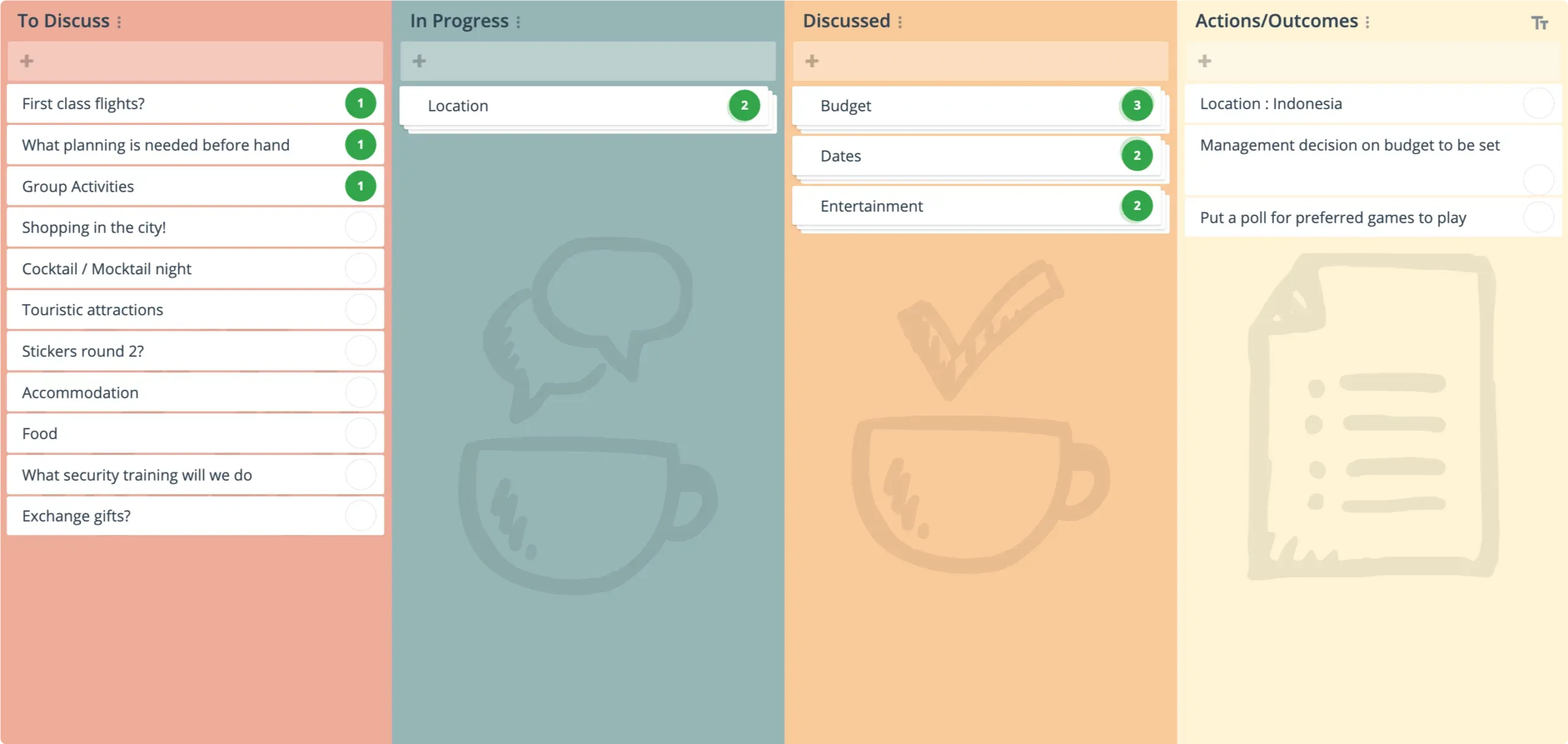
Lean Coffee has basic columns:
- To Discuss: What topics should we discuss?
- In Progress: The current topic being discussed.
- Discussed: These topics have been discussed.
Why do a Lean Coffee?
Some of the reasons for running a lean coffee in GroupMap are:
- It offers structured discussions with flexibility for participant-driven topics.
- You can choose the level of anonymity depending on how comfortable the team feels.
- You can easily facilitate discussions one at a time with an in-built timer.
- People can comment on each idea in real time to further encourage engagement and discussion.
- It helps foster team work, collaboration and communication as well as a problem solving mindset.
Lean Coffee formats are a great way to help teams reflect, prioritize challenges, and celebrate successes. The outcomes are a shared understanding of what’s next, clear action items, and a stronger sense of ownership across the team.
Tips for an effective Lean Coffee
- Make your Lean Coffee anonymous to encourage ideas from the quieter or introverted members.
- Avoid deep dives. Set a 3 to 5 minute limit for the first pass for each topic. Call for a hands up if more time is needed.
- Lean Coffee is agenda-less by design, so encourage both technical and interpersonal issues.
- If there are too many topics for the limited time, use dot voting to prioritize the discussion.
- If a topic can’t be resolved, or an action created, tag or color code it as a Parked item for future discussion to allow the meeting to flow.
Who should use a Lean Coffee template?
A Lean Coffee retrospective is perfect for teams that value structured yet flexible discussions. It’s especially useful for teams looking to explore a wide range of ideas or tackle pressing challenges in an open, democratic environment.
Teams that thrive on collaboration and prefer discussions over rigid processes will benefit most from a Lean Coffee template.
For cross-functional groups, agile teams, or any setting where diverse perspectives need to be heard, the Lean Coffee lets everyone contribute to ensure their voices are heard and issues that are on their mind can be raised.
How to run a Lean Coffee retrospective
There is very little preparation needed to run a Lean Coffee. That’s part of the charm. Simply choose the Lean Coffee template in GroupMap to get started.
Related templates
References
- Agile Coffee
- The Structured, Agenda-Less Meeting Format
- How to run remote Lean Coffee retrospective
- Lean Coffee Facilitator’s Guide
Save effort, time and money with GroupMap
GroupMap offers more than just an online digital whiteboard. Its innovative platform is designed to enhance the quality of your team’s decisions. With features that prevent bias and keep facilitation simple, GroupMap makes sure no single voice dominates and keeps conversations productive and inclusive. Its intuitive interface is easy for anyone to use, and its scalable design supports small teams and large groups whether they are face to face or around the globe. Customizable templates and workflows keep discussions focused on objectives, helping you drive actionable outcomes each and every time.
Frequently asked questions
What is Lean Coffee?
How does a Lean Coffee meeting work?
Why run a Lean Coffee?
What is the difference between Lean Coffee and a normal meeting agenda?
Who should use a Lean Coffee?
How long should you discuss each Lean Coffee topic?
How to run it in GroupMap

Share the theme
Share the focus of the session, such as Process Improvement or Team Challenges.

Brainstorm
Encourage participants to add their topics in the “To Discuss” column. Use anonymity options to help everyone contribute openly.

Prioritize
Allocate votes to allow everyone to vote on their top priorities.

Discuss
Set the timer and discuss each topic in priority order.

Decide
At the end of each discussion round, decide if more time is needed, an action can be created, or the topic can be moved to Done.
Ready to get everyone on the same page?
Start a free GroupMap and turn your next discussion into clear, shared decisions.