PMI (Plus, Minus, Interesting)
Use the PMI (Plus, Minus, Interesting) template to weigh an idea from three angles. Participants brainstorm individually, then vote and decide together.
What is Plus, Minus, Interesting (PMI)?
A critical thinking and brainstorming tool, PMI was developed by Dr. Edward de Bono. It fosters discussion of an idea from multiple points of view, specifying what is positive (plus), negative (minus) and what might be neither but is worth considering (interesting). It can be used for a retrospective exercise or a futurespective one depending on the context of the topic.
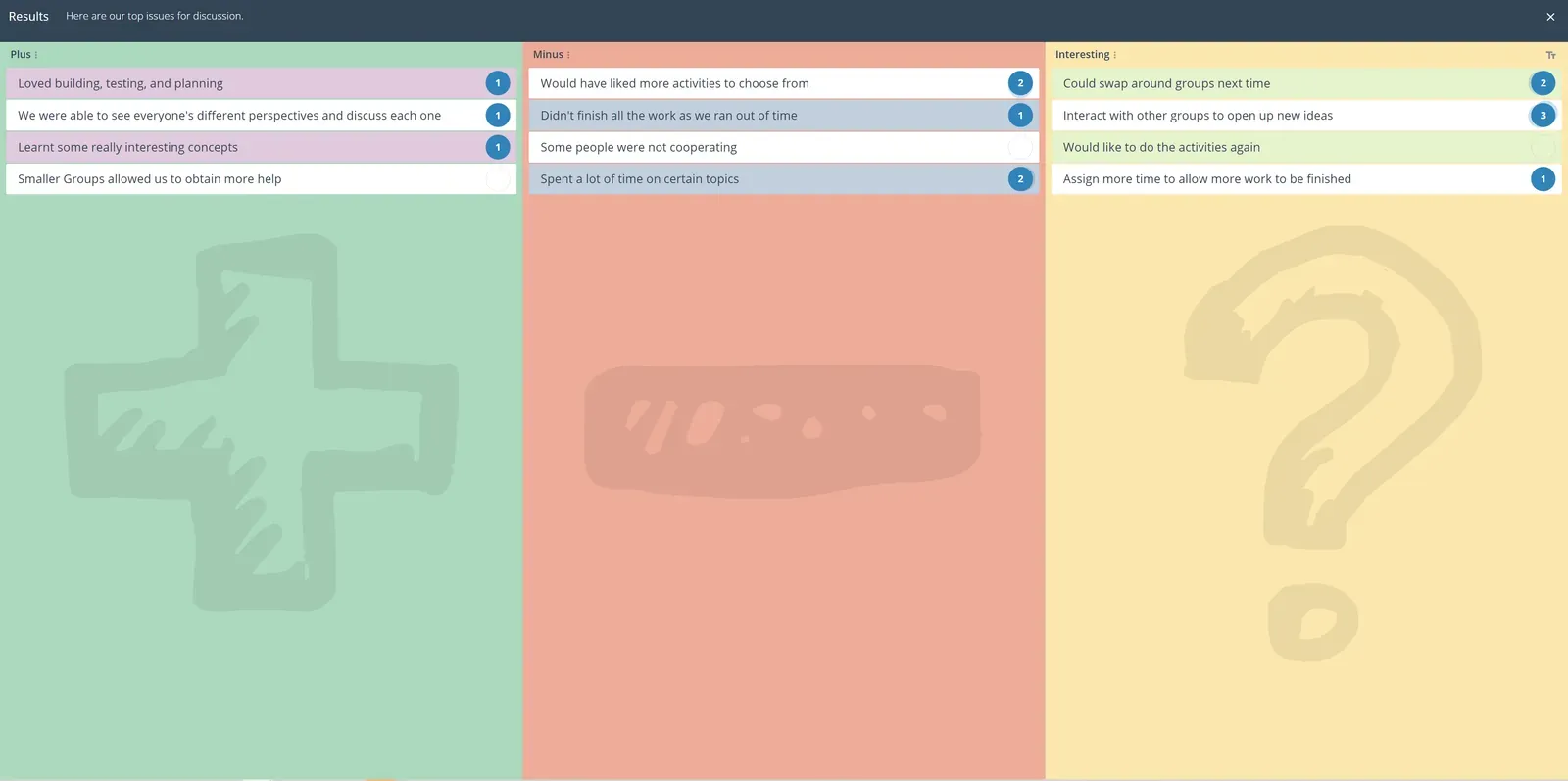
As one of the simplest templates to use, the goal is simply to provide everyone the opportunity to express their views from different perspectives. The PMI Template essentially lists headers of Plus, Minus and Interesting and allows participants to add ideas in, either one column at a time, or across the whole template depending on the style of your conversations. By using the template and having people brainstorm individually, there is less groupthink and bias and anchoring of ideas or opinions.
Who should use the PMI framework?
- Agile or scrum teams
- Change managers
- Workshop facilitators
- Policy and change makers
- Teams having to evaluate a decision or outcome
- Project teams, including remote teams
- Education settings and lesson plans
Related templates
- Six Thinking Styles
- Plus Delta retrospective
- Start Stop Continue
- Agile retrospective
- 4L’s retrospective
Examples of PMI statements
- What are the positive things about this sprint/policy/feature/issue?
- What are the negative (minus) things about this sprint/policy/feature/issue?
- What is interesting about this sprint/policy/feature/issue?
References
Why should I run a PMI retrospective?
The simple goal of Dr De Bono was to overcome some of the narrow views that can be shared when a person expresses their opinion. By considering the plus, minus and interesting aspects of the same decision, it opens up each person’s thinking and encourages creativity. In scrum or agile retrospectives, the PMI is a very useful tool for getting groups who are stuck to list down different perspectives and to then consider the whole picture.
How to use the PMI template to run better meetings
GroupMap runs PMI as a group exercise rather than a free-for-all on a whiteboard. Everyone fills in the plus, minus and interesting columns independently first, so the cautious view and the enthusiastic one both reach the map before anyone reacts to either. The room then rates the points worth discussing, and the conversation starts from the whole picture instead of from whoever spoke first. It is worth watching what the minus column does to an idea that looked obvious going in, because that is usually where the session earns its time.
Save effort, time and money with GroupMap
GroupMap offers more than just an online digital whiteboard. Its innovative platform is designed to enhance the quality of your team’s decisions. With features that prevent bias and keep facilitation simple, GroupMap makes sure no single voice dominates and keeps conversations productive and inclusive. Its intuitive interface is easy for anyone to use, and its scalable design supports small teams and large groups whether they are face to face or around the globe. Customizable templates and workflows keep discussions focused on objectives, helping you drive actionable outcomes each and every time.
Frequently asked questions
What is a PMI (Plus, Minus, Interesting) analysis?
What does the Interesting column capture?
When should you use PMI?
Why does PMI reduce bias?
How is PMI different from a pros and cons list?
Who uses the PMI framework?
How to run it in GroupMap

Brainstorm
Start brainstorming through each of the different topics.

Vote
Have people voted on the topics that they would like to discuss the most.

Share
Share the results and facilitate the discussion towards a decision.
Ready to get everyone on the same page?
Start a free GroupMap and turn your next discussion into clear, shared decisions.