Team Canvas
The Team Canvas was first developed by Alex Ivanov and is designed to work through with your team to help teams function effectively.
What is a Team Canvas?
The Team Canvas was first developed by Alex Ivanov and is designed to work through with your team. By working through the elements outlined, you’ll collectively map the purpose, objectives, metrics, values, behavioral standards, influence, inclusion, rituals, and symbols that help teams function.
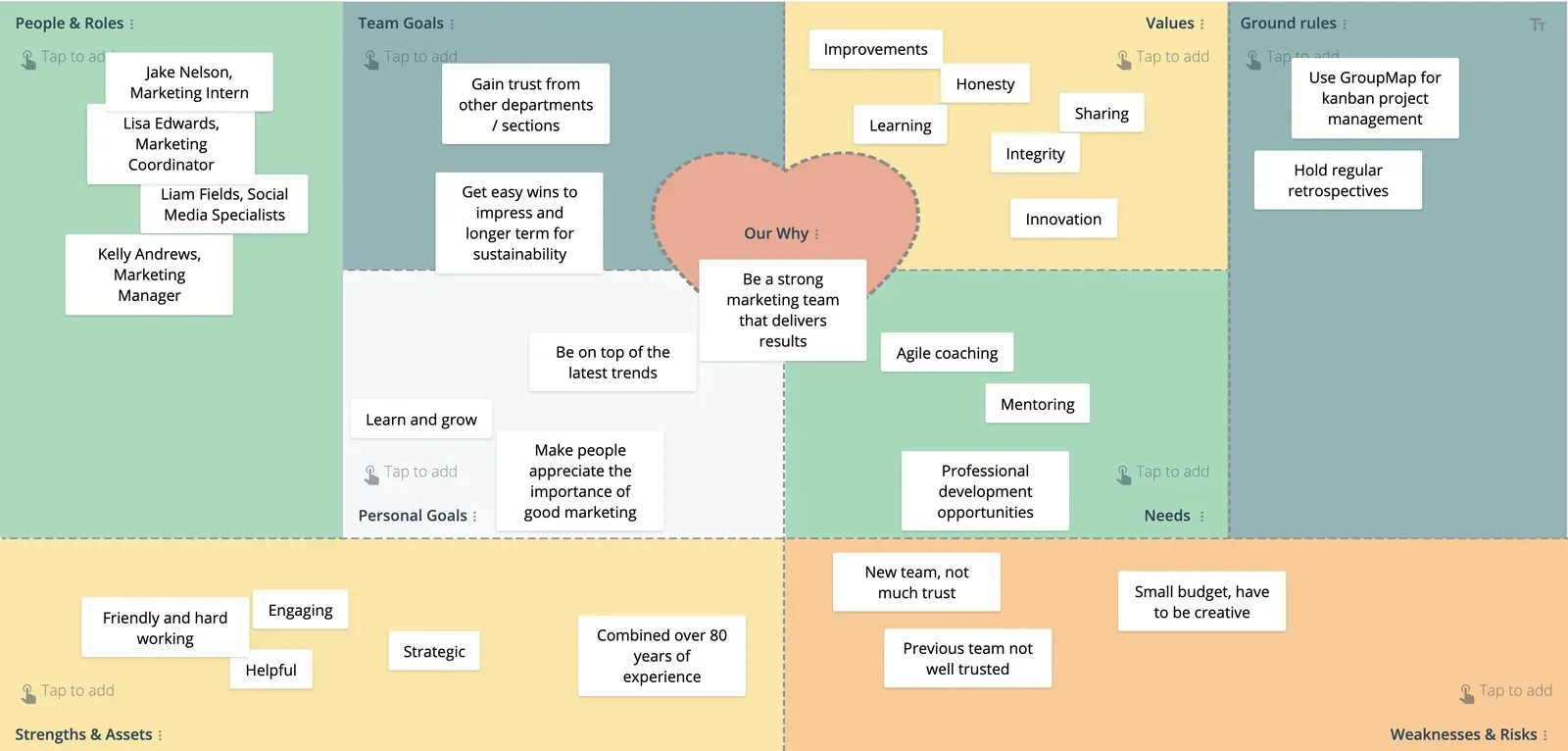
You can use the Team Canvas for new teams or teams that may be struggling and could do with some improvement.
The Team Canvas is also used to guide better choices, solve conflicts, lift, or add more meaning to the workday.
Elements for brainstorming in a Team Canvas can vary from a “basic” five elements of Purpose, Goals, Roles and Skills, Values, and Rules and Activities to a full version that explores key aspects of personal and team alignment, key values and goals, as well as the expectations and capacity of the team.
Elements explored in the full version of the Team Canvas include:
- Identifying People and their Roles in a team;
- Outlining the Purpose of “why are we doing this in the first place?”
- Looking at the Common Goals that as team you would like to achieve in a feasible, measurable and time-bounded way;
- Brainstorming what each team member’s Personal Goals are;
- Sharing what are the Values of the team that they stand for and guide the way they work and operate;
- Looking at the Strengths and Assets available now within the team to achieve the Goals set;
- Understanding what Weaknesses and Risks are recognized individually and as a team;
- Checking to see what Needs and Expectations are required for each team member to achieve the Common and Personal Goals;
- Setting the Rules and Activities that the team together would like to introduce after completing the Team Canvas.
Related templates
Tips for effective facilitation of Team Canvas
- Start by showing the team canvas and explain that together you’ll be using it as a tool to help you understand each other better.
- Allow for anonymous brainstorming if you feel like your team would be more comfortable to honestly express their thoughts and ideas.
- Walk through each of the elements in the Team Canvas with your team and provide example questions that resonate the most and can help in your team providing structured ideas and feedback.
Why do a Team Canvas?
The Team Canvas exercise is for every team member to participate actively with help from a facilitator. The canvas helps everyone map out their desired future state and goals.
It makes it visible for everyone and transforms abstract team concepts into visible concrete ones.
The outputs of the canvas are the guide rails that will help prevent team members falling off the edge when there are conflicts, decisions, or problems. It’s designed to help you foster team performance.
Who should use a Team Canvas?
The Team Canvas has been designed to assist leaders and teams in organizations in challenging the current state and imagine a better future state for how they work. Use the exercises to adopt new team norms, introduce practices and rituals for how they can work more effectively.
Use the Team Canvas to help:
- Your team navigate the ups and down and provide some early warning signals so the team can adjust;
- Your team to understand and agree on purpose, goals, measures, and values;
- Your team decides what behaviors and rituals to support your goals and values.
Team Canvas template
The Team Canvas template is divided into eight “windows” or elements to brainstorm ideas on, with a center focus on the Purpose of conducting the exercise. Designing a team is an iterative process, and together with your team, you can prototype behaviors and rituals that reflect your team values and objectives using the Team Canvas. Together you can examine if it’s working for you, collect feedback and fine tune as you go.
People & roles
What are your names and the roles in the team? What are we called as a team?
Values
What do we stand for, what are our guiding principles, what are our common values that we want to have at the core of our team?
Personal goals
What are our individual personal goals? Are there personal agendas that we want to open up?
Strengths and assets
What are the skills in our team that will help us achieve our goals? What are we good at, individually and as a team?
Common goals
What you as a group really want to achieve? What is your key goal is measurable, feasible and time bounded?
Rules & activities
What rules do we want to introduce after this session? How do we communicate and keep everyone updated? How do we make decisions? How do we execute and evaluate what we do?
Needs and expectations
What each one of us needs to be successful? What are our personal needs towards the team to be at our best?
Weaknesses and risks
What are the weaknesses we have individually and as a team? What are some obstacles we see ahead of us?
How to do a Team Canvas
Use the Team Canvas exercises to adopt new team norms, introduce practices and rituals for how together everyone can work more effectively. The Team Canvas can help all team members begin conversations, gain clarity and produce results.
Tip To get the most from the Team Canvas, gather input from a range participants with different perspectives. When you’re working with a large or distributed team, getting everyone together at the same time can be difficult, inconvenient, and costly. Using different technologies like video conferencing, online forms, and collaborative brainstorming software such as GroupMap can help overcome these challenges.
Start by showing the team canvas and explain that together you’ll be using it as a brainstorming tool to help you understand each other better:
- People & Roles: start by identifying who’s involved in the Team Canvas exercise. Ask people to put their names and roles down.
- Purpose: then work through brainstorming ideas to define what is your team purpose. Sharing a sense of purpose helps connect and propel people forward. It would help if you always mapped your team purpose to align with your organizational mission and values.
- Common Goals: Brainstorm the goals that each team member thinks for their overall team purpose and/or projects you might be working on. If your team show polarizing goals, it might come across as a red flag to be addressed in another exercise.
- Personal Goals: Ask team members about the individual goals that they personally have for the team and/or for projects or initiatives discussed.
- Values: When mapping your team values, they should align with your organizational values and mission. Team values include things like, what you value as a team, your team norms, when and how you work best. Try to ask your participants to capture their ideas in one word for this.
- Strengths & Assets: Identify the key pieces of skills (hard skills and soft skills) and assets available within the team.
- Weaknesses & Risks: Brainstorm together to share the key weaknesses and areas for improvement that team members face individually, as well as obstacles they face as a team.
- Needs & Expectations: In this step, we want to map what practices you value most as a team and what else is required to make sure the team is successful.
- Rules & Activities: Collaboratively agree on rules and activities that will help support responsibility, better conversations, inclusion trust, and ultimately, designed to support the behaviors you want to see from each other.
Tip
Online collaboration tools like GroupMap significantly reduce the amount of resources required to combine independent lists. They also make organizing and prioritizing the ideas faster and more straightforward, thus providing savings in time and effort over traditional brainstorming tools such as a whiteboard or post-it notes.
Go through each of the brainstorming elements (i.e. for every question except for People & Roles), and see if it is possible to group them based on similar themes.
For example, under the Values element, there might be similar words such as: Honesty, Integrity, Trustworthy and Straightforward which can be grouped under the “Honesty” theme.
In GroupMap, grouping based on the above mentioned criteria can be easily and visually done by everyone by identifying the grouping and adding the ideas under each group.
Once you have identified specific grouping for each of the elements, encourage your team members to vote – this can be done using a thumbs up or dot voting system – the themes that are most important to support the team going forward.
The themes with the most votes will form the rules that will help define the way the team works, communicates, collaborates and improves together.
Combining individual voting into an overall score is much easier and faster if you use an online tool like GroupMap, especially if you have a few ideas to vote on.
Share the results of your Team Canvas to all team members and have it available as a reminder on what rules for working you have set together. This can also be used to onboard new team members and approach new projects together.
Tip
GroupMap automatically generates visually appealing reports and action plans in several formats for distribution, saving time and effort after the analysis.
Save effort, time and money with GroupMap
GroupMap offers more than just an online digital whiteboard. Its innovative platform is designed to enhance the quality of your team’s decisions. With features that prevent bias and keep facilitation simple, GroupMap makes sure no single voice dominates and keeps conversations productive and inclusive. Its intuitive interface is easy for anyone to use, and its scalable design supports small teams and large groups whether they are face to face or around the globe. Customizable templates and workflows keep discussions focused on objectives, helping you drive actionable outcomes each and every time.
Frequently asked questions
What is a Team Canvas?
What are the elements of a Team Canvas?
When should a team use a Team Canvas?
How do you facilitate a Team Canvas?
How is a Team Canvas different from a retrospective?
How to run it in GroupMap

Brainstorm
Encourage the sharing of ideas and opinions for each of the nine elements included in the Team Canvas. Structure brainstorming by explaining each element and providing example questions.

Group
Identify common themes from the brainstorming session that can be grouped into a focus area. By doing this you can condense ideas into one key idea and be able to view them easier and better.

Rate
Invite participants to vote on the ideas that they see as the most important. Define the objectives of voting, such as “can be easily measured and is time-bounded,” or “can be done with the current resources available.”

Share
Collate and then share the results of your team exercise so that everyone can easily reference the agreed upon decisions, behaviors and rules going forward.
Ready to get everyone on the same page?
Start a free GroupMap and turn your next discussion into clear, shared decisions.