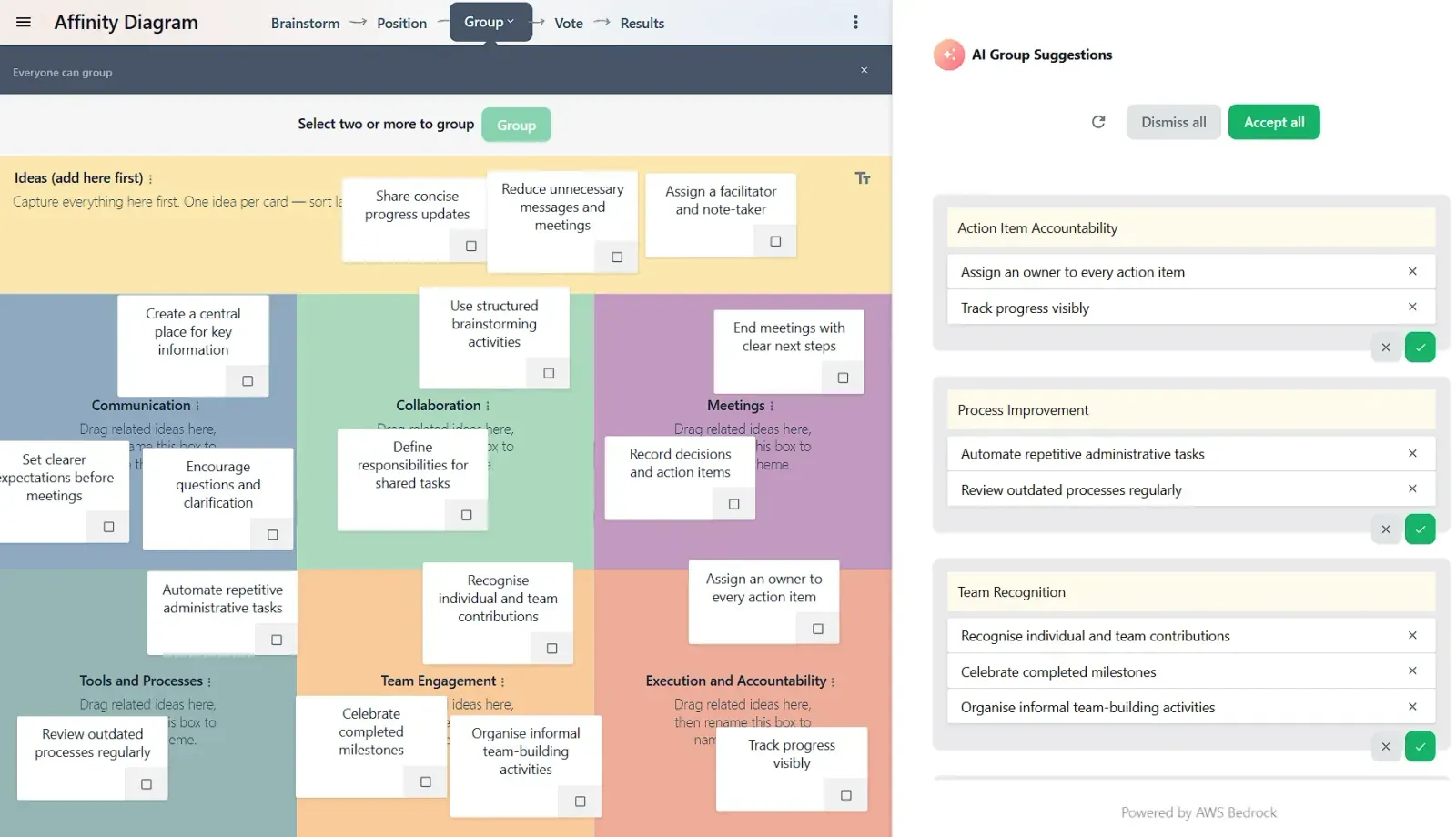
AI affinity mapping: group a wall of ideas into themes in seconds
GroupMap's AI grouping suggests themed clusters for your brainstormed ideas. Accept or dismiss each one, then move the room straight to voting.
Every good brainstorm ends the same way: a wall of ideas, and a room waiting to see what they mean. Sorting that wall into themes is where the insight lives. Run by hand, it’s also usually the longest pause in the agenda. Someone reads each note aloud, duplicates get debated, and the energy you built during ideation drains while cards get dragged around.
GroupMap’s AI grouping does that first sort for you. It reads the ideas on your map, proposes named themes, and hands the decision back to you and the room.
What is affinity mapping?
Affinity mapping (also called affinity grouping, or building an affinity diagram) is the technique of sorting brainstormed ideas into clusters of related items, so a group can see the handful of themes behind dozens of individual notes. It’s a staple wherever qualitative input piles up: workshop outputs, user research, retrospectives, community consultations.
The method is simple; the live logistics aren’t. Grouping thirty ideas in front of an audience means holding their attention through every move, and the first person to say “these two go together” quietly frames how the rest get sorted. That’s the gap AI affinity mapping closes.
Let AI suggest the themes
When your session reaches the grouping step, AI group suggestions can make the first pass. The AI reads what participants actually wrote and proposes clusters, each under a plain-language theme name. In a brainstorm about how the team works together, that might be “Process Improvement”, “Team Recognition”, and “Communication Clarity”, with each idea already sitting under the theme it supports.
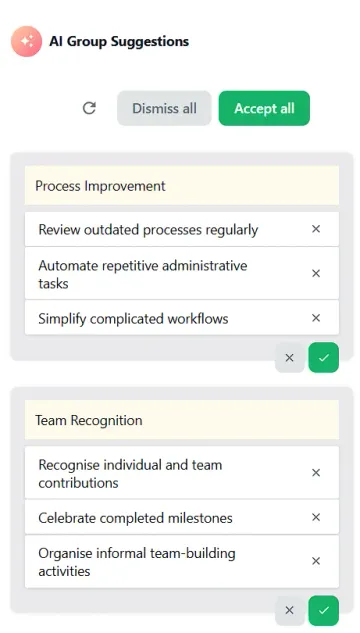
Nothing moves on the map until you say so. Each suggested group can be accepted or dismissed on its own, you can accept or dismiss the whole set, and if the cut doesn’t match how the room thinks, regenerate it and get a fresh take. Manual grouping hasn’t gone anywhere either — select two or more ideas and group them yourself, or refine the AI’s clusters by hand.
Why a suggested first cut changes the session
The value isn’t only speed. GroupMap already has participants brainstorm independently before seeing each other’s ideas, so the input isn’t anchored by the loudest voice. AI grouping extends that neutrality one step further: the first cut at the themes comes from the ideas themselves, not from whoever reached the board first.
Your job as facilitator shifts from drag-and-drop to the conversation that actually matters: do these belong together, what should we call this, and which theme deserves our votes? The mechanical sort takes seconds, so the discussion gets the minutes.
How to run an AI-assisted affinity map
- Pick your map. Start from the affinity diagram template or any of GroupMap’s 130+ templates — AI grouping works on whatever the room has brainstormed.
- Brainstorm independently first. Participants add ideas without seeing the group’s, which keeps the input honest and gives the AI real variety to work with.
- Group. At the grouping step, review the AI’s suggested themes: accept the ones that hold, dismiss the ones that don’t, regenerate if you want a different cut, and adjust by hand.
- Vote and decide. With ideas consolidated into themes, the room votes on substance instead of splitting support across duplicates. Results and actions then follow in the same map.
From a wall of ideas to a decision
Grouping is the hinge of a session: it’s how a hundred sticky notes become five things worth deciding on. If you like to theme ideas as they arrive, tagging with a color legend is still there for you — and when the wall is full, AI grouping gets you from ideas to themes while the room’s energy is still high.
Try it in your next session. Start your 14-day free trial, or contact us if you’d like a walkthrough.
Related posts
 January 2, 2025Want to save time in 2026? Try these meeting alternatives
Cut calendar clutter in 2026 with alternatives to meetings: async updates, decision docs, office hours and AI summaries to keep work moving.
 December 28, 20226 easy ways GroupMap can level up your online brainstorming meeting
Run a more focused online brainstorming meeting with 6 practical tips to boost participation, structure ideas, and improve follow-up fast.
 December 23, 2021How online brainstorming templates, tools and techniques can improve your meetings
Discover online brainstorming tools, templates, and techniques that improve meeting structure, participation, and idea quality.
Ready to get everyone on the same page?
Start a free GroupMap and turn your next discussion into clear, shared decisions.