Plus Delta Retrospective
Looking to reflect on your team's recent project or sprint? Consider using the Plus Delta retrospective method!
What is a Plus Delta Retrospective?
The Plus Delta retrospective is a simple way to collect feedback from team members to support the continuous improvement of a certain process, activity, project, or event.
Start a Plus Delta retrospective in GroupMapIt gives team members a chance to express what they thought of the last sprint in very simple terms. This easy retrospective helps them focus on the positives, so the team can gain a sense of accomplishment, build confidence, learn from the things that went well, and change what didn’t.
Why run one?
The Plus Delta template helps to:
- Assess the effectiveness of a new process or system
- Evaluate the results of a project
- Review the performance of a team
- Highlight areas of success
- Increase self-awareness
- Encourage feedback
- Foster teamwork
- Build trust
- Identify and prioritize action items
Who should use the Plus Delta Retrospective?
The Plus Delta retrospective is a great tool to use with a newly formed agile team. It is a template that could be used by Scrum Masters and their agile software development teams.
It could also be used by any group looking to reflect on a process or project and improve.
Related templates
Tips for an effective Plus Delta Retrospective
-
Create a safe and respectful environment where team members feel comfortable sharing their thoughts and ideas.
-
Stick to the Plus Delta template and keep the conversation focused on the specific project, event, or team performance that you are reviewing.
-
Encourage quiet team members to speak up, and avoid letting any one person dominate the conversation.
-
Set specific goals and objectives for the session and communicate them clearly to the team.
-
Once the retrospective is over, make sure to follow up on the action items that were identified.
References
- Agile Retrospectives: Making Good Teams Great
- Preparation and Facilitation of Retrospective Meeting in Scrum process
- Are Your Online Agile Retrospectives Psychologically Safe? the Usage of Online Tools
Plus Delta Retrospective template
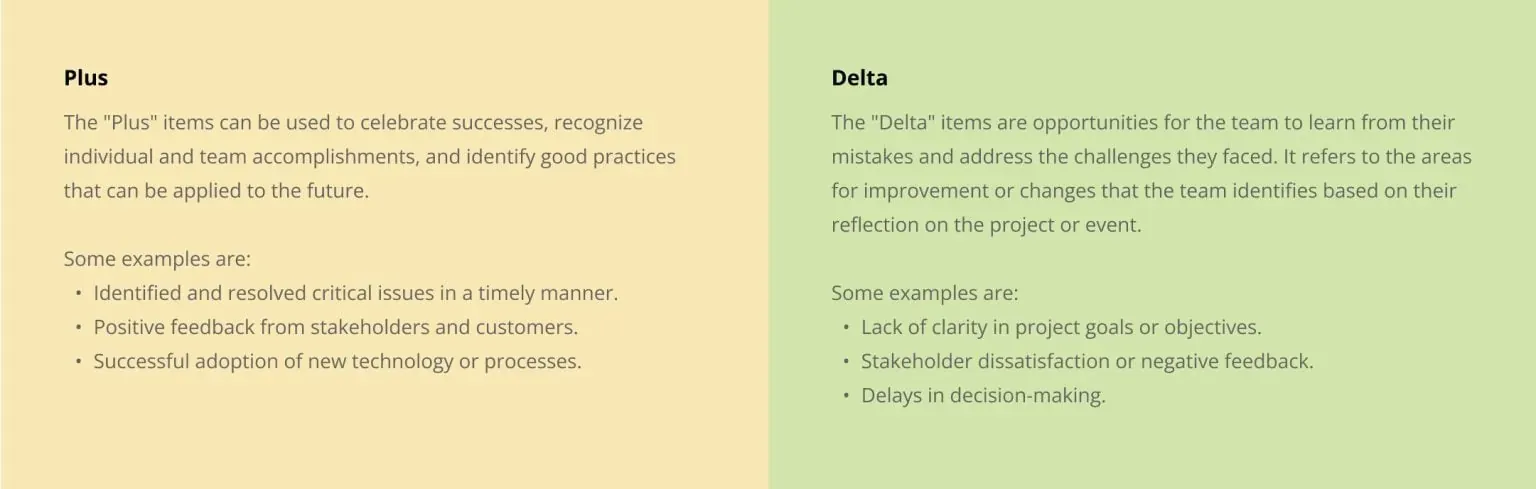
How to run a Plus Delta Retrospective
The Plus Delta retrospective can help create a culture of continuous improvement within a team.
For teams that are working remotely or are located in different geographical locations, using an online collaborative tool like GroupMap can be an effective way to facilitate the process. It can create a shared space where team members can collaborate and contribute their ideas.
Start by sharing the Plus Delta template with the team members. Allow all team members to brainstorm ideas. They can contribute in real time or synchronously.
Once all team members have added their ideas to the Plus and Delta board, facilitate a discussion where the team can group the topics, discuss the items that have been added and identify areas for improvement. Prioritize the items in the delta column, and assign actions to team members to address them.
Use GroupMap to track progress, assign responsibilities, and set deadlines. Follow-up with team members to ensure that actions are being completed, and review progress in future meetings to assess the effectiveness of the changes made.
Start a Plus Delta retrospective in GroupMap
Save effort, time and money with GroupMap
GroupMap offers more than just an online digital whiteboard—it’s innovative platform is designed to enhance the quality of your team’s decisions. With features that prevent bias and make facilitation seamless, GroupMap ensures no single voice dominates and ensures productive, inclusive conversations. Its intuitive interface is easy for anyone to use, and its scalable design supports small teams and large groups whether they are face to face or around the globe. Customizable templates and workflows keep discussions focused on objectives, helping you drive actionable outcomes each and every time.
Frequently asked questions
What is a Plus Delta retrospective?
What do Plus and Delta mean?
How do you run a Plus Delta retrospective?
When should you use a Plus Delta retrospective?
Who should use a Plus Delta retrospective?
How to run it in GroupMap

Brainstorm
Populate each section of the template

Group
Group similar ideas into one.

Vote
Vote on the key ideas you wish to action

Action
Share and implement agreed actions

Share
Share the outcomes of the session, including the action plan, to relevant stakeholders.
Ready to get everyone on the same page?
Start a free GroupMap and turn your next discussion into clear, shared decisions.