Icebreakers for large groups
How to open a session with 30, 100 or 300 people. Group-size bands, five icebreakers that scale, and the timing math that decides which one fits your room.
What makes a large group different
Most icebreakers were designed for a room you can go around. Once the room is bigger than that, the activity itself is rarely the problem. The turn-taking is. A thirty-second answer from every participant is a pleasant five minutes at ten people, fifteen minutes at thirty, and most of an hour at a hundred.
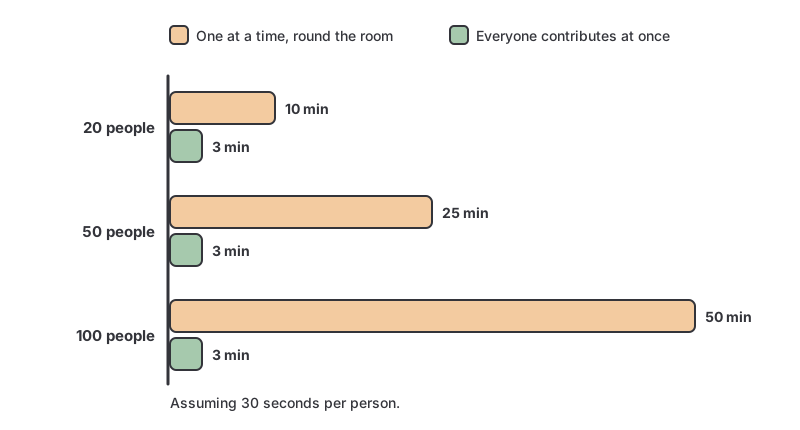
That is the whole design constraint. An icebreaker scales when contributions happen in parallel rather than in sequence, and when the output is something the room can read at a glance instead of something the room has to sit through. The icebreaker games built into GroupMap meetings respect the same constraint: the library filters by group size, so you can pick one that fits your headcount.
Key takeaways
- The break point is not a headcount, it is the moment a go-round costs more than the warm-up is worth, usually around 25–30 people.
- Activities scale when participants answer simultaneously; they break when answers are serialized.
- Past roughly 100 people, a second constraint arrives: the room can no longer read a board full of raw contributions, so you have to group and vote before you show it.
- Large rooms are usually rooms of strangers, so pitch the prompt lower than you would for a standing team.
- Always read something back. An icebreaker nobody refers to again teaches participants that the warm-up was filler.
Choose by group size
| Room size | What breaks first | What to run | What to watch |
|---|---|---|---|
| 20–40 | The go-round starts eating the agenda | One simultaneous activity on a shared board | Silence while people find the link |
| 40–100 | Nobody can read a wall of raw answers | Simultaneous input, then group and vote before showing | Reading out too many cards |
| 100–300+ | The room stops behaving as one group | One board per table or breakout, consolidated at the end | Tables drifting onto different questions |
The bands matter more than the exact numbers. What you are really choosing between is one conversation, one board with a filter on it, or many small conversations that report back.
Five icebreakers that scale
1. Where in the world
Every participant drops a card onto a map: where they are joining from, where they grew up, or the place they would rather be. It is the most reliable large-group opener there is, because the output is a picture rather than a list, and a picture of 200 pins reads better than a picture of 20.
Why it scales: the board is more interesting the fuller it gets. Watch for: a room where everyone is from one city, so swap the prompt to somewhere they have traveled.
2. A one-word mood check-in
Ask for a single word on how people arrived: the state they are in, not the state they would like to project. With a big room the aggregate is the point. You can see at a glance whether you have walked into a tired audience or a restless one, and adjust the first session accordingly.
Why it scales: one word per person means the wall stays readable into the hundreds. Watch for: asking for a sentence. At 150 people, a sentence is a wall of text.
Run it with the Mood Wall template, which gives participants a set of moods to place themselves against rather than a blank box.
3. This or that, run as a vote
Rapid binary choices: early bird or night owl, spreadsheet or whiteboard, the tea-or-coffee family of questions. In a small room this is a show of hands. In a large room, run it as a vote so the split is a number on the screen rather than a guess from the stage.
Why it scales: voting is the one activity that genuinely gets better with headcount, because the percentages stabilize. Watch for: questions with an obvious “correct” answer, which produce a 97% split and nothing to talk about.
4. A question wall
Invite the room to post the questions they arrived with, then dot vote to find the handful everyone wants answered. This doubles as an icebreaker and as your agenda check. You learn what the room actually came for before you have spent an hour on the wrong thing.
Why it scales: the voting step does the filtering that a facilitator cannot do live at 200 people. Watch for: running it without anonymity in a group that includes people’s managers.
5. Table intros that report back
For a room laid out in tables or split into breakouts, give each table its own board and the same prompt, and ask every table to send one line back to the whole room. Twenty tables produce twenty lines, which is a plenary you can actually run.
Why it scales: it converts one impossible conversation into many easy ones. Watch for: tables answering different questions. Write the prompt as the objective on every board so it cannot drift.
One that does not scale cleanly: a photo wall past about fifty people. It is a lovely activity, but 200 images is a scroll rather than a wall. If you want it in a big room, section it: one prompt per table, or one per department.
Two truths about big rooms
They are usually rooms of strangers. A large group is rarely a standing team. Conference audiences, training cohorts, all-hands and public consultations are made of people with different employers, seniority and stakes. Prompts that assume shared history (“your proudest moment on this project”) land badly. Prompts that need nothing but a person (“a place you have been”) work everywhere.
Anonymity changes what you get. In a small group, names build connection. In a large group with mixed seniority, names suppress. If the icebreaker is going anywhere near how people actually feel about the day ahead, turn anonymity on and accept that you are trading warmth for honesty.
How to run a large-group icebreaker in GroupMap
A whiteboard at the front of a big room captures whoever is loudest and closest. In GroupMap every participant contributes from their own device at the same time, so the activity costs the same few minutes whatever the headcount.
- Set the prompt as the objective, so every participant, and every table host, reads the same question.
- Share the link, code, or QR code. Participants join with no account and no install, which is what keeps the start of a big session from stalling.
- Everyone answers at once. With individual brainstorming mode, participants add their own answer before seeing the group’s, so the first confident response does not set the pattern for the room.
- Group the answers into themes, so a board of hundreds of cards becomes something readable from the back row.
- Dot vote, and read back the top few rather than trying to give every contribution airtime.
- Carry one line forward into the first working session, so the room sees that the warm-up counted.
For a session laid out in tables or breakouts, create one map per table in a workspace, then consolidate them into a single view for the read-back. Invite co-facilitators if the room is big enough that one person cannot watch every board.
What to watch for
- The activity is not the risk, the read-back is. Most large-group icebreakers fail at the end, not the start. The board fills up and then nothing is ever said about it.
- Silence at the join step reads as a failed activity even when it is just a slow link. Put the join code on the screen before the break, not after it.
- Do not run an icebreaker that needs a microphone in a room bigger than about forty. Passing a mic is a go-round, whatever you call the activity.
- Bigger is not deeper. A large group can produce a lot of contributions quickly, but it will not produce disclosure. Save the reflective activities for the breakouts.
Related templates
- Icebreakers and warm-ups: the four core icebreaker templates and how to run them.
- Mood Wall: a one-glance read on the state of the room, which is the check-in that scales best.
- The ESVP: find out who in the room is an explorer, shopper, vacationer or prisoner before you start.
- Meeting agenda template: plan the session the warm-up is opening.
- Group mind mapping: where a big room goes next once it is warmed up.
References
- Icebreakers are terrible. They also, unfortunately, work really well.: on why the awkwardness is not a reason to skip them.
- The effect of an icebreaker on collaborative performance across a video link: measured effect on groups working remotely.
Open a big room without losing the first hour
The reason large-group icebreakers get cut is that they cost too much time for what they return. GroupMap changes the arithmetic: every participant contributes at once from their own device, the answers group and rank themselves through voting, and you read back a handful of themes instead of sitting through a hundred turns. The warm-up finishes in the few minutes you planned for it, and the room starts the real work already talking.
Frequently asked questions
How many people counts as a large group?
What are some good 5-minute icebreakers for large groups?
What are some good icebreakers for a group of 30 people?
What are some fun icebreakers for a large group online meeting?
How long should a large-group icebreaker take?
How do you run an icebreaker with a large group in person?
How to run it in GroupMap

Objective
Write the prompt as the objective so every participant reads the same question, however big the room is and whoever is hosting each table.

Brainstorm
Everyone answers at once from their own device instead of waiting for a turn, so the activity takes the same few minutes at 30 people as at 300.

Group
Cluster the answers so a wall of hundreds of cards becomes a handful of themes the room can actually read from the back.

Vote
Dot vote to surface the handful of answers worth reading aloud, rather than trying to give every contribution airtime.

Results
Show the live board on the main screen and call out the top themes, then carry a line from it into the first working session.
Ready to get everyone on the same page?
Start a free GroupMap and turn your next discussion into clear, shared decisions.